

Webhooks Integration
Webhooks allow your server to automatically receive notifications about events in our system. Instead of periodically polling the API, you configure one endpoint and we send you an HTTP request for each important event.
To connect webhooks, you need:
- Create an HTTPS endpoint that accepts JSON requests.
- Send us the URL of this endpoint.
- Choose which events you want to receive.
- Accept and test webhook.
How it works in general
- An event occurs in our system (for example, a payment is created or its status has changed).
- We form a webhook notification in the form of an HTTP POST request with a JSON host.
- We send a request to your endpoint.
- Your server handles the request and responds with 2xx (usually 200) if it is successful.
- In case of 4xx or 5xx we will try to resend the webhook (Repeated 5 times at 3-second intervals, every 5 minutes.)
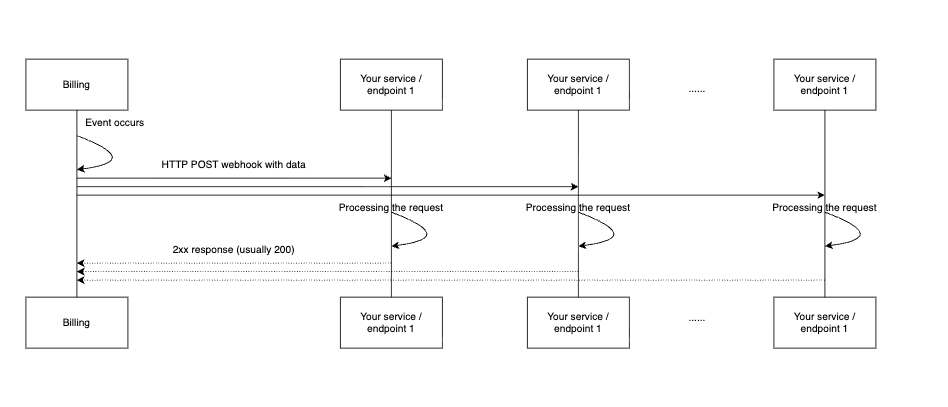
Webhooks allow your server to automatically receive notifications about events in our system. Instead of periodically polling the API, you configure one or few endpoint and we send you an HTTP request for each important event.

Webhook retry logic
A webhook is considered successfully delivered only when your endpoint returns a response with a 2xx HTTP status code.
If the delivery fails we retry sending the webhook.
Retry schedule:
- Up to 30 delivery attempts in total.
- Attempts are grouped by 6.
- Each group is sent approximately once per hour.
- Within one group, retry attempts are sent with intervals of a few seconds.
This means that after a failed delivery, you may see several retry attempts close to each other, followed by a pause before the next group of attempts.
Example retry pattern:
Retry attempts grouped by hour

Retry attempts within one group, sent with intervals of a few seconds

First you need to prepare an endpoint/endpoints on your system that will accept webhook requests. Depending on your integration architecture, different webhooks can use the same shared endpoint or separate endpoints.
Endpoint requirements:
- Must accept HTTP POST requests.
- Must be accessible via HTTP.
- If the request is successfully processed, the HTTP code must be returned from the 2xx range (for example, 200 OK).
Recommended processing approach:
- Must accept HTTP POST requests.
- Write event to log/database.
- It is desirable to reply as soon as possible (the processing can be put in an asynchronous queue).
- Return response 200 OK if the request is accepted.
We support a common webhook-notification format for all events. The specific event type is defined by the type field in the JSON body.
You can select one or more event types. Once connected, we will send you webhooks only for the selected events.
What to do:
- View the list of available events (see below)
- Determine which events you need.
- Send us a list of event identifiers.
For example:
I would like to receive subscription_manual_chargeback, subscription_event_refund, subscription_user_create
You can change the list of events at any time - just send us a new list.
After you have:
- configured the endpoint,
- gave us the URL,
- selected and agreed the list of events,
we connect your endpoint and start sending webhooks.
At the connection stage we can send a test webhook to make sure that:
- your endpoint is accessible over the network,
- requests are successfully accepted,
- you correctly process JSON and return the 2xx response.
What you should do:
- Check the server logs and make sure that the test webhook has been received.
- Make sure that the processing is done correctly (for example, these events are saved in your system).
- If necessary, adjust the processor.