

Merchant Authentication to Pay service
Integration steps
After the merchant confirms their readiness to integrate with Core Billing, the billing manager will provide the following data for the integration process with the payment gateway:
code– the merchant code,publicKey– the public access key that must be used in thex-public-keyheader,secretKey– the private access key that must be used to generatex-tokenfor each request.
To start using the Authorization service, you need to integrate valid headers that will be used for authentication and authorization.

Please note that all new headers are MANDATORY and must be included in the request for every Pay service endpoint.
New headers
x-public-key- a public key that identifies the merchant account (there may be several for one merchant);
- required for validation and generation of
x-token; - replaces the
Brandheader.
x-buyer-ip- contains information about the buyer’s IP address;
- required for validation and generation of
x-token; - cannot be
nullor an empty string; must be a valid IPv4/IPv6 address; - replaces the
x-client-ipheader and other standard headers related to the buyer’s IP address.
x-date- contains the date and time when the request is sent;
- required for validation and generation of
x-token; - format:
Y-m-dTH:i:s(for example,2024-01-27T23:59:59).
x-token- generated on the merchant side.
Principles of
x-token generationUsing the hmac(sha256) hashing algorithm, build a hash from the string secretKey + x-public-key + x-buyer-ip + x-date, using secretKey as the key.
1// const secretKey = "8e44a84ae4abfd4af9a25b71158b69537a13407f2acda9f17774d747c709b37b";
2// const publicKey = "b163e75c-e384-4a69-ad0f-5aad135bc6b7";
3
4var moment = require('moment');
5var CryptoJS = require('crypto-js');
6
7pm.environment.set('x-date', moment().format(("Y-m-dTH:mm:s")));
8var xDateHeader = pm.environment.get('x-date'),
9    xPublicKeyHeader = publicKey
10                    ?? pm.environment.get('x-public-key')
11                    ?? pm.globals.get('x-public-key'),
12    xSecretKeyHeader = secretKey
13                    ?? pm.environment.get('x-secret-key')
14                    ?? pm.globals.get('x-secret-key'),
15    xBuyerIpHeader = pm.globals.get('x-buyer-ip');
16
17var tokenString = xSecretKeyHeader + xPublicKeyHeader + xBuyerIpHeader + xDateHeader;
18var token = CryptoJS.HmacSHA256(tokenString, xSecretKeyHeader).toString(CryptoJS.enc.Hex);
19console.log("secret = " + token);
20console.log("date = " + xDateHeader);
21console.log("PublicKey = " + xPublicKeyHeader);
22console.log("secretKey = " + xSecretKeyHeader);
23console.log("ip = " + xBuyerIpHeader);
24
25pm.request.addHeader("x-date: " + xDateHeader);
26pm.request.addHeader("x-public-key: " + xPublicKeyHeader);
27pm.request.addHeader("x-buyer-ip: " + xBuyerIpHeader);
28pm.request.addHeader("x-token: " + token);1<?php
2
3$json = '{
4 "x-buyer-ip": "10.10.10.10",
5 "x-date": "2024-01-27T23:59:59",
6 "x-public-key": "aa46a835-36fa-4f75-ba3d-dc8785912345",
7 "secretKey": "secret-key-test123123123abc"
8}';
9
10$data = json_decode($json, true);
11
12$xToken = hash_hmac(
13 'sha256',
14 $data['secretKey'] . $data['x-public-key'] . $data['x-buyer-ip'] . $data['x-date'],
15 $data['secretKey']
16);
17print_r(['x-token' => $xToken]);
18/*
19Array
20(
21 [x-token] => 5cdc01c2d66c52a513f58e077d85660468852fc141d305888416a151a05dc159
22)
23*/Authorization procedure
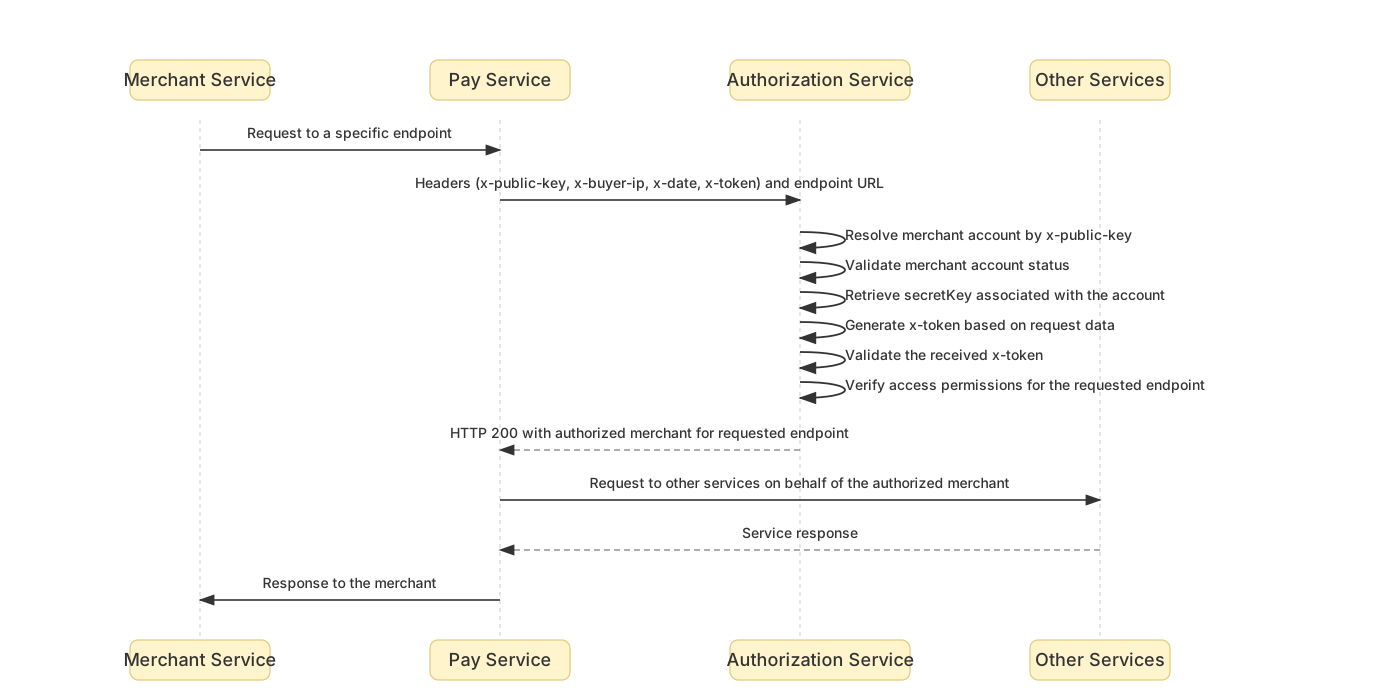
After all Integration steps have been completed, the successful authorization flow will look as follows (step by step):
- The merchant’s service sends a request to a specific Pay service endpoint.
- When the Pay service receives the request, it takes the headers from the request (
x-public-key,x-buyer-ip,x-date,x-token) as well as the endpoint URL and forwards them to the Authorization service. - The Authorization service validates the received data:
a. Based on the receivedx-public-key, it determines the merchant account, checks that it is active, and obtains itssecretKey;
b. Generates anx-tokenfrom the received data using the same algorithm as the merchant;
c. Compares the generatedx-tokenwith the one received from the Pay service;
d. Checks the merchant account’s access to the requested endpoint;e. Sends a200status with the merchant code back to the Pay service. - The Pay service receives the
200status and sends the request to other services on behalf of this merchant. - The Pay service returns the response to the merchant.
Note: If at any stage of the checks and validation performed by the Authorization service a mismatch is detected, the merchant will receive a 500 or 401 error in future releases.
1{
2  "uuid": null,
3  "message": "Unauthorized service use is forbidden",
4  "code": 0,
5  "traceId": "e8977d1cfc799423d8eb7e8d9000965f"
6}